Lexicon version: Version Beta 1.10.130 Operating system (remove one): Mac
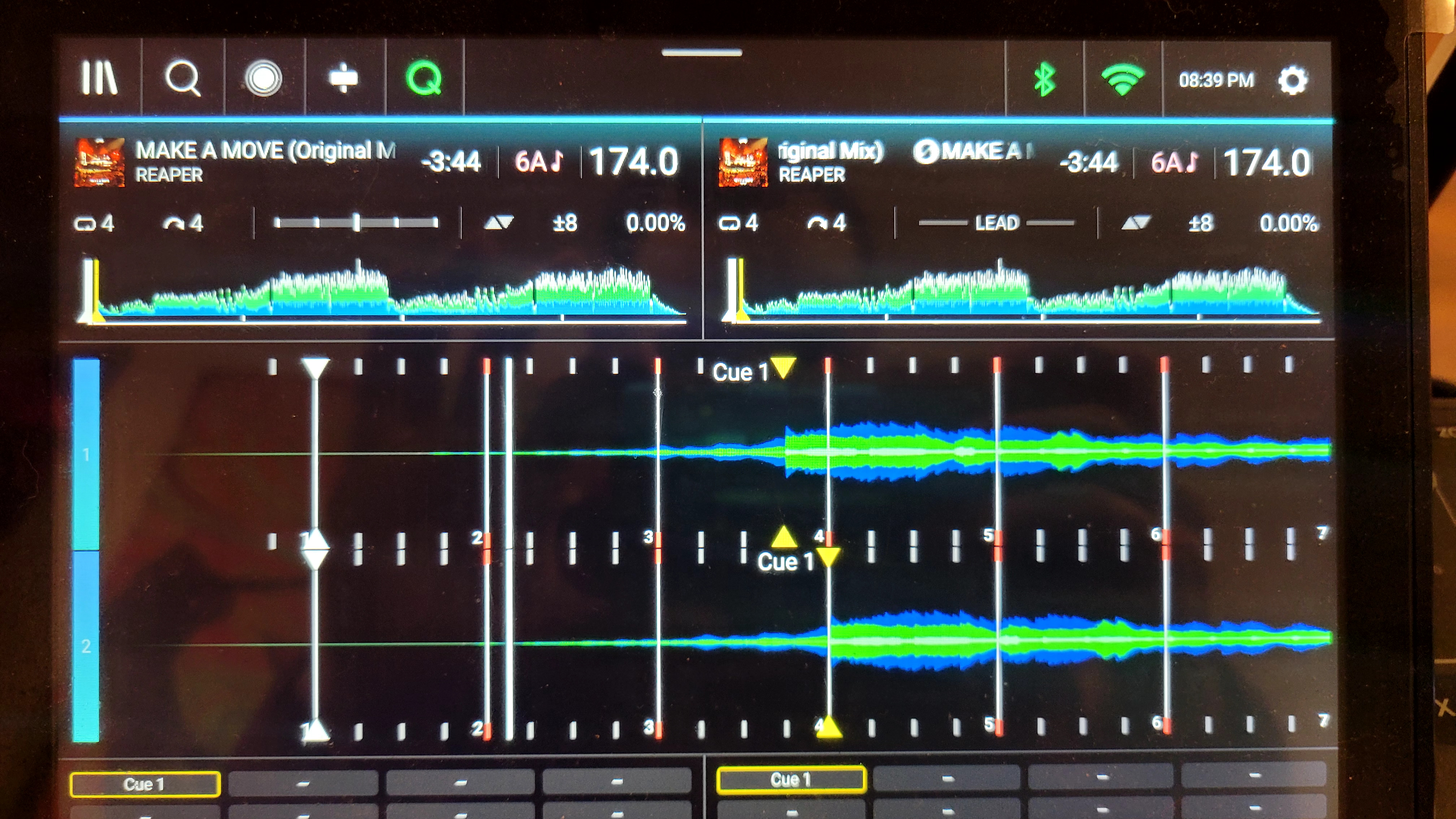
Bug description: The beat-grid is off by 1 beat on this track after I imported and exported from an engineDJ USB. I imported a playlist of 25 tracks, exported it, and started going through track-by-track to make sure they looked right. On the 4th track I found this issue.
Step by step to reproduce:
Import tracks from an engineDJ USB
Export tracks to a different engineDJ USB. Plug into your stand-alone player.
Observe that sometimes the beatgrid is off by a beat. I don’t know if engineDJ is re-analyzing these tracks or not. I did notice that my queue points are correct, its only the beatgrid that is off
shown above: on the bottom and right is the original USB. on the top and left is the USB exported by lexicon after importing the track from the one on the right.
Update on this: What I suspect happened is that since I had ‘dont touch my beatgrids’ enabled during the first export, lexicon exported without beatgrid data? I’m not sure. The track had never been on the USB that I exported to. But I don’t really know
But in any case I tried again with ‘dont touch my beatgrids’ disabled and now the data is correct on the USB.
I think its still a bug, on initial export the beatgrid was incorrrect. The track was new to the USB which means the beatgrid should have been exported with it. Or it might be a bug like some of the others I’ve seen where a random subset of tracks will have the issue. I’m not sure. But still a bug
I don’t know if I can reproduce it consistently. I don’t really want to try to debug this more at the moment. I have spent too much time trying to debug this software from the outside. It just takes too long to try importing and exporting repeatedly to try to reproduce these issues…
A simple unit test would be way easier. I’m hoping you can investigate on your end, I sent you my engine database a while back and I’m hoping you can just write some tests around it. You can use my python gist from earlier to check the output. Maybe just run my python script on the original and pipe to a file, then import and export to a new database file. Then run my python script again and see if everything was preserved including bpm, etc. Check for differences. Throw it in a unit test framework with various settings including having this checkbox checked vs unchecked. Have an AI find the bugs from there
Both these things should be added to your tests. I feel like you are relying on AI to tell you what is happening and the AI is hallucinating answers here. I’m guessing thats how you ended up with the (incorrect) theory about engindj desktop messing up sample rate before. You need some tests and to eliminate all those try/catch and fall-back blocks that AI adds. Those try/catch blocks hide your problems and the AI will hallucinate guesses about what is happening
I’m sorry. I’m just frustrated with how much time I’ve spent on this. I’ll see if I can get you some example databases. I’m also going to see if I can throw together a quick library for converting between lexicon/engineDJ databases