Lexicon version: 1.8.7
Operating system (remove one): Mac
Bug description:
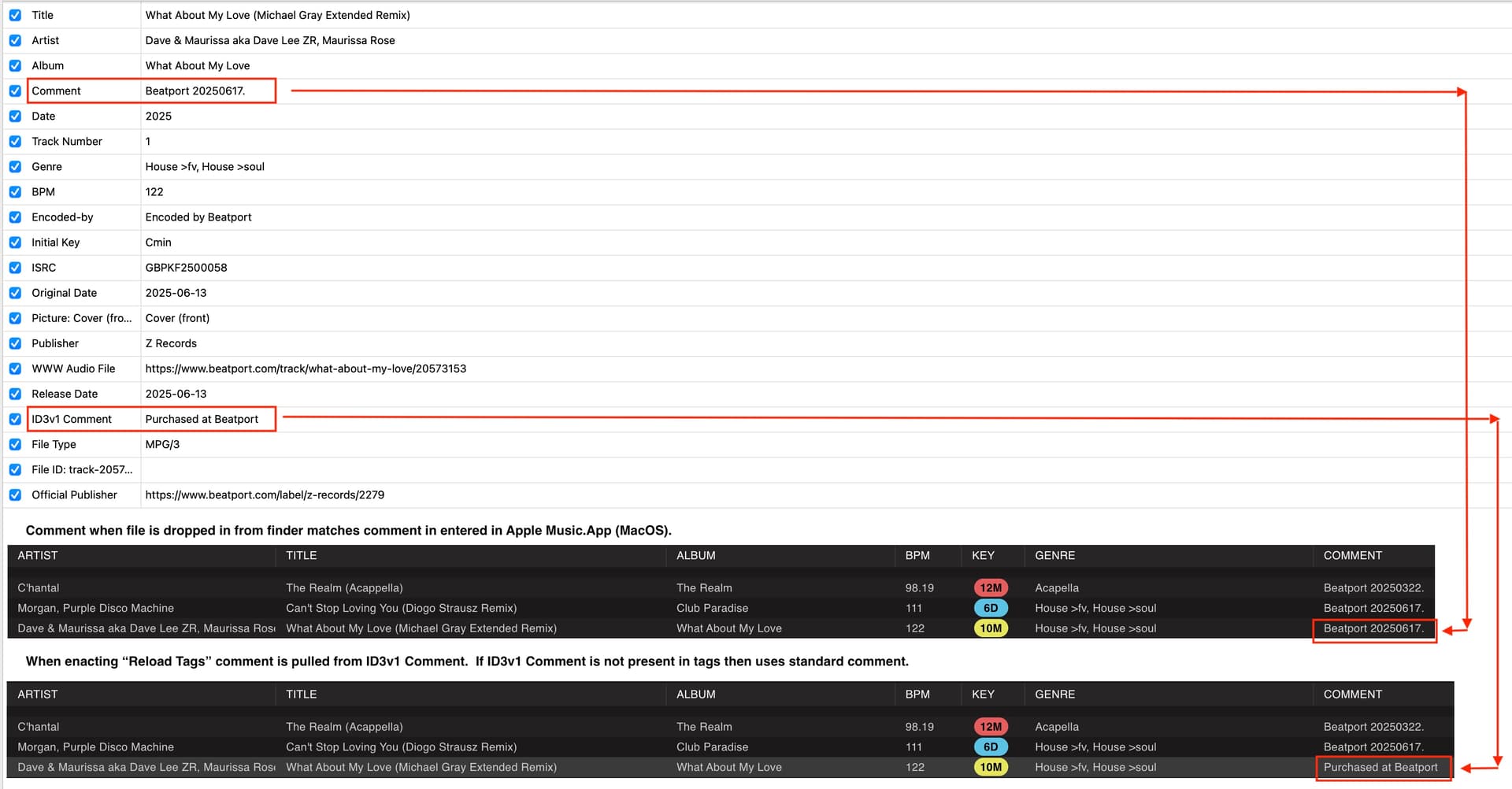
I maintain my ID3 track data in Apple Music.app (all local files, as I don’t subscribe to Apple Music.). My library is primarily in AIFF format. When I add files via Finder the ID3 data for Comments populates as it shows in Apple Music.app (presumably ID3 v2 Comment data). But, if I subsequently edit the Comment tag in Apple Music.app and use Reload Tags, those data for Comment in Lexicon DJ populate with an ID3 v1 Comment tag, if that is present in the file. E.g., Beatport stores “Purchased at Beatport” as a ID3 v1 Comment, which is not visible in Apple Music.app, but is visible in KID3.
Step by step to reproduce:
- Drag a Beatport purchase into Apple Music.app. Edit the Comment field. E.g., I enter purchase vendor and date in the field. Navigate off the record so it syncs with Apple Music.app.
- Drag the track into Lexicon DJ. The Comment field as shown in Apple Music.app is populated.
- Choose “Reload Tags” in Lexicon DJ with Comment field checked as one of the options. The Comment field is then populated with the ID3 v1 Comment field data.