I currently use a Denon Prime4+ standalone for most of mixing/track preparation at home. I have yet to fully figure out and perfect my sync workflow and the unpredictability when trying to play on Pioneer equipment is a massive drain. For the most part, I follow the workflow here:
Specifically my workflow is: Step 1 - Core Library Management on SSD: All my songs exist in a folder on a external SSD (backed up of course). When updating my lexicon library, I simply drop the folder into the Lexicon UI to add any new songs that I have downloaded into the folder Step 2 - Lexicon Playlist Preparation and Management: I do playlist preparation, editing, and tag management in Lexicon. No cues/loops - and I let Lexicon analyze it if it’s a new song but it usually gets overwritten when I… Step 3 - Lexicon to Engine DJ playlist sync: Sync to Engine DJ - I go to the Lexicon sync module and then sync to Engine DJ. The playlists from Lexicon appear as normal and everything looks to be working right. At this point, I export songs from Engine DJ to a smaller storage USB and then load them onto the Prime 4+. Once they’re on the Prime4+, I let the controller analyze them and adjust beat grids, tempos, cues/loops as necessary Step 4 - Prime4+ to Laptop Engine DJ track info re-import: Once I’m happy with the updates, I eject the USB and plug it back into my laptop and import the updated track info through the normal Engine UI. Step 5 - Engine DJ to Lexicon re-import: Afterwards, I close the engine dj app and then do “Import Tracks and Playlists option” so the new track info is updated accurately and correctly in lexicon. PROBLEM AREA 1 - Source Directory update: At this point, the tracks in many of these playlists go from having their source directory (previously G:/Music i.e. the folder on my ssd) changed to F:/Engine Library/Music/track.wav. Now all the tracks that have had this change cannot be located and I have to reconstruct these playlists from scratch using the G:/Music version and I’m not sure if the cues/hotloops are included when I replace them. If I use the relocate tracks feature here, it has like a 30% hit rate when I try to relocate them back to the G:/Music folder Step 7 - Lexicon to Rekordbox sync: Assuming I get past this problem area, and have a few crates ready to go for a gig on Rekordbox equipment, I sync to rekordbox from Lexicon and the playlists show up - great! However… PROBLEM AREA 2 - Rekordbox analysis overwrite: In order to work the way I’d like on CDJ’s, the tracks need to be analyzed in Rekordbox before they’re exported onto the USB. This can completely throw off all the track notation I’ve done in Engine and finding that out at showtime can be really unfortunate.
So my question is: what am I doing wrong? I’m not sure if there’s a better way here. Is there a setting that I’m missing? Happy to provide additional details if that would help.
Are you syncing to an Engine USB or to Engine desktop? With the former it will copy the tracks to the Engine Library folder so you can use that device (usb or hard drive) and plug it into Denon hardware.
As for RB, you need to analyze with only Phrase enabled, not bpm/beatgrid.
@RooL_Sounds It sounds complicated and prone to error with all the back and forth. I switched to using Lexicon DJ when Engine DJ desktop sync started failing a year ago (on version 4.1). In that case, EDJ refused to sync some of my smartlists. Perhaps, this is because I have over 100 smartlists. I carefully tag my tracks so when I drop them in the collection they automatically appear in the genre, date, artist, source, etc. smartlists. I tried all sorts of fixes (new install, alternate computers) and nothing would fix it.
After trial and error, I concluded it is best to do all of my preparation in LDJ (beatgrid, cues, loops) and sync in LDJ directly to EDJ OS performance drives. I also sync to EDJ desktop, just for kicks, but, basically, I no longer use it. This also allows me to sync to all the other supported DJ software. Well, there are a few issues with sync to Virtual DJ I need to raise at some point, but I don’t use VDJ right now. The EDJ sync has been working perfectly for a year. The full sync is super fast compared to sync in EDJ desktop to OS. Thank you @Christiaan !
There are a few trade-offs in this approach.
LDJ does not support EDJ stems. This has not been an issue for me, as I use Ableton Live for track edits and, now, stems. Neural Mix Pro is also useful for extracting stems to use in the Ableton Live remixes.
I don’t do any track prep I expect to save on the Denon Prime units. This may be a non-starter for some, but I have gotten used to doing all my prep in LDJ. I remember or make note of beatgrid, cue, loop changes done on the units, if I want make those edits in LDJ. Technically, I suppose, they could be synced back, but I haven’t taken time to figure that out. My axiom is make LDJ the master (“one library”) and sync from there.
Last, not a trade-off, but my modus operandi. I eventually warp tracks with uneven BPM with Ableton Live. This “fixes” them eternally so there is no need to abandon any semblance of a beatgrid and ride them while mixing or for setting tons of variable beatgrid anchors. Of course, tracks with transitional BPM (e.g., Lil Louis: French Kiss) are an exception.
Are you syncing to an Engine USB or to Engine desktop
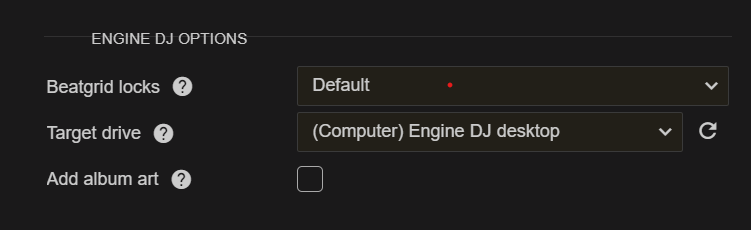
Are you talking about at Step 3 in my process? I am syncing to Engine desktop. Could you help me understand the difference between that and syncing to Engine USB? I’m assuming the attached screenshot is what you’re referring to right?
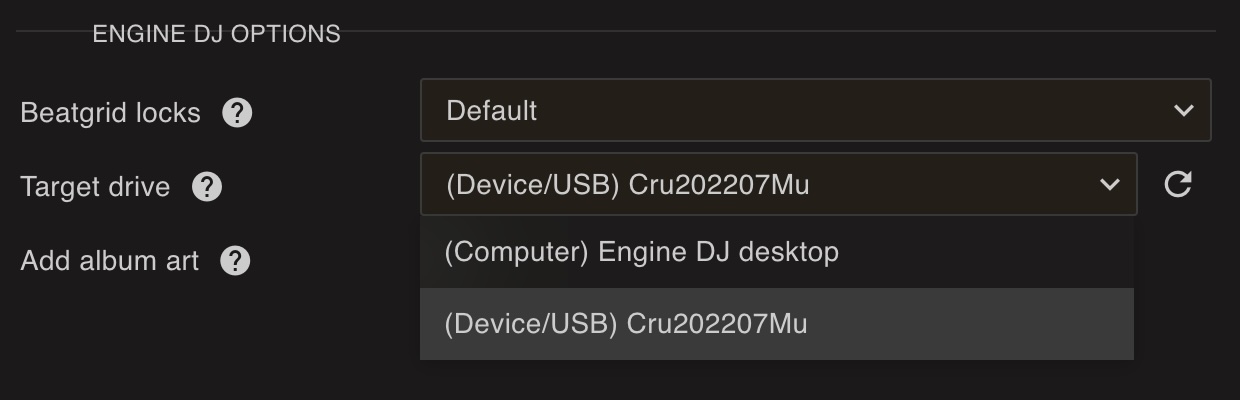
Where it says “(Computer) Engine DJ desktop”, if you have performance drive(s) or your Denon Prime unit with an installed drive connected to your computer, the drop down on the right will show you other sync options. The Device/USB sync will write Engine DJ OS files and music to your attached drive that you can use directly with your players.
Thank you for the clarification. If I’m unprepared to let go of Denon’s track preparation features (especially because I really enjoy doing track prep on my Prime4), is there a way to fix Problem Area 1 at least? I think the solution @Christiaan provided worked for problem area 2 but I need to confirm.
If you sync from Lexicon directly to your Prime or USB (so not Engine desktop), it will remember what track it was there so re-importing from Prime/USB will not copy any file but it should only import your tracks info (cues etc) back to the correct original files in Lexicon.
If you sync to Engine desktop and then let Engine desktop create the Prime/USB then that link does not exist, so you have to skip Engine desktop for that.