I dont understand your comment that ‘the first one wont work, Lexicon doesnt have that info so I can’t change that’? Lexicon shouldnt need any info as it doesnt need to recognise it as a stem (indeed, I presume it can’t), all its doing is syncing the file to Traktor. Unless it somehow updates Traktors nml file in some different way, Traktor should detect the file as a stem file in the normal manner. the fact that it doesnt indicates that somehow a file added to traktor via lexicon results in a different nml to a file added directly…unless Im misunderstanding something?
for completeness I have now also uploaded the nml file after syncing back from lexicon. You can see that what it has done is remove those 2 stem files from the ‘lexicon test’ playlist (which is expected as lexicon wasn’t adding them), but they remain in the collection and still work as stem files.
Interestingly, this nml file has now grown in size from 4.7MB to 6.6MB which is a bit surprising and may or may not be relevant.
So, the behaviour seems to have changed from as originally described, which I can’t explain as I’ve done multiple tests around this.
I don’t see the m4a track in both the NMLs so I can’t compare them
hmmm, odd, just uploaded a new nml file where have verified that the ‘lexicon test’ playlist has the 3 files in it
And the nml after the sync? I don’t see the soleil soleil track in there at all
I know, thats because Lexicon doesnt import those tracks from Traktor, and so they are also missing when you sync back to traktor as it removes them from the ‘lexicon test’ playlist (though they are still on the overall track collection). I mentioned this in my earlier reply
right, apologies…looks like I must have uploaded an nml from a previous Traktor version which would explain why its a different size. I have just uploaded another copy named with v2 which is the nml after syncing back from lexicon to Traktor. in it you can see the ‘lexicon test’ playlist now only has the 1 aiff file, the 2 m4a’s have been removed, but they are in the collection.
Sorry if this caused some confusion
Okay so I just took your new NML (v2) and put it in my own Traktor. Relocated the Soleil Soleil track so I can load it and this is what I get:
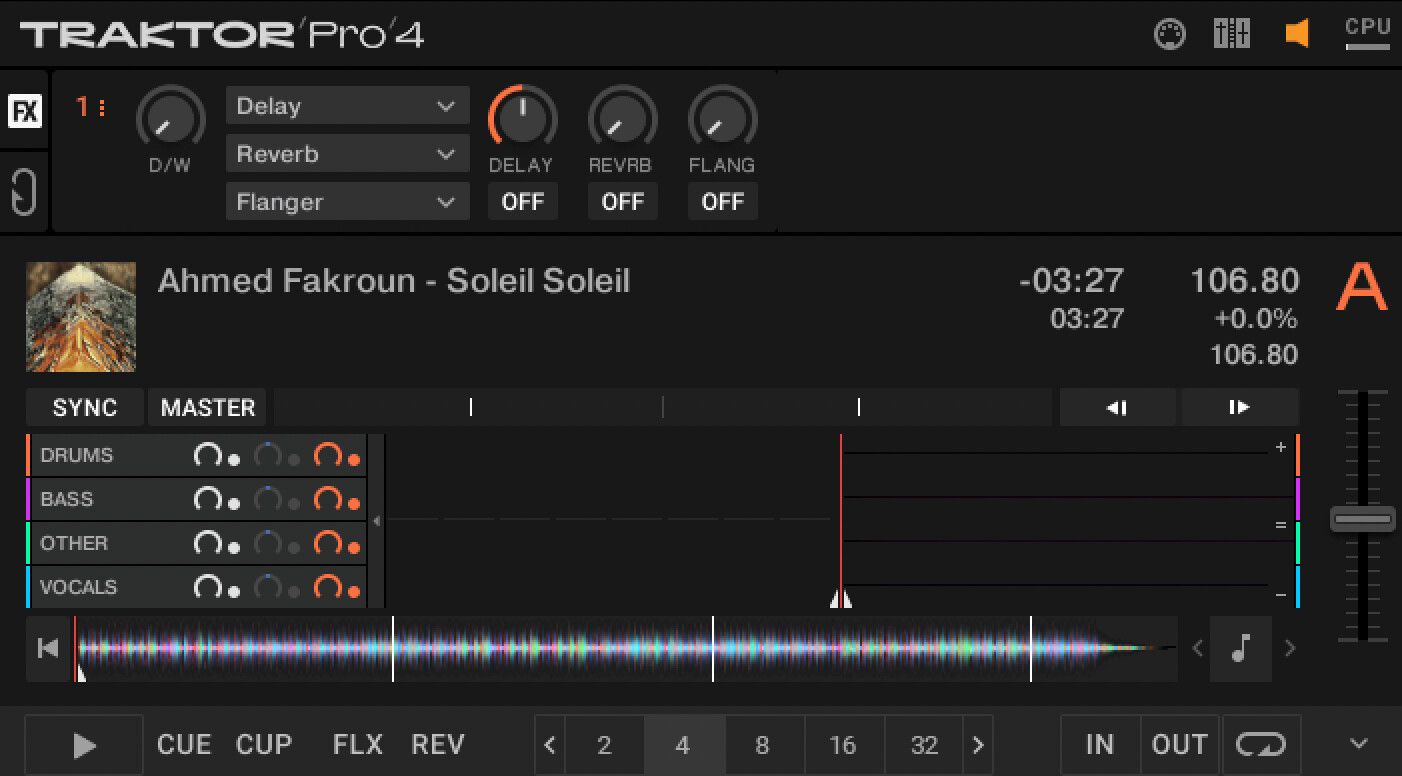
But you are saying that this NML did not show stems on that track?
I can see the stems in the NML so the info is there. If you aren’t seeing stems in this NML and I am then the only reason I can think of is that Traktor reloads them on relocate.
No, I think the issue is slightly different. Lexicon is not syncing m4a stem files from Traktor to Lexicon. If you look at that nml file you’ll notice that the ‘lexicon test’ playlist only has the 1 aiff track in it. As noted previously, the file is in the collection, and it loads as a stem, its just that its been removed from the playlist(s). I seem to be getting inconsistent behaviour though which is making this more difficult…
Previously Lexicon wouldn’t sync these files in either direction. Testing this again just now and if I add the track first in Lexicon it does sync across (and work), if I then sync back to Lexicon it disappears from the playlist in Lexicon, and then obviously removes it from Traktor at the next sync back to Traktor.
Does this make sense?
thinking about the inconsistent behaviour a bit more…previously I added the tracks as ‘incoming’ which would physically move them when marking as done, whereas the test just now I added to lexicon directly by dragging it into the playlist. Just wondering if that might have resulted in the different behaviour
There should not be an issue with playlists, that’s completely unrelated to stems and if there is a problem there, it would happen to any filetype.
Incoming may have something to do with it, moving files is always problematic
well I can reproduce the issue (with variations), if you can follow the same steps and let me know if you’re able to reproduce this too:
- delete the Soleil track from the collection in Traktor
- drag the Soleil track into a test play list on Lexicon
- sync LXC > Traktor, selecting just that 1 playlist
- open Traktor and confirm the track has been added to the playlist
- confirm if it loads as a stem - just tried this again and this time its not loading as a stem…so more inconsistent behaviour
- sync traktor > LXC, confirm that the Soleil track is now missing from the playlist in LXC. Again more inconsistent behaviour as now it does appear
This inconsistency is frustrating…it seems to be 1 of 2 outcomes:
- either the track syncs across as a stem, but gets removed from the playlist
- or, it stays in the playlist but Traktor doesn’t see it as a stem
At this point Im beginning to question my sanity, but its definitely not working properly!!
Steps 1-5 is all what I expect and not something I can fix. Because Lexicon does not recognize stems on your m4a file, so it will sync it as a normal m4a file, no stems. So when traktor loads, it wont have any stems in the NML and Traktor does not check for stems because it only seems to do that when you drag tracks in. I think the only solution for that is to drag tracks into Traktor before dragging them into LXC.
I did your steps, 1-5 same result as you, as expected. Then step 6 I am seeing the track in the LXC playlist.
I’ve just uploaded a video showing (one of) the issue. In it I add a stem track to a traktor playlist with 1 other non stem track in it. I then sync to lexicon and only the non stem track comes across
Can you upload that file too and also your NML again? When that file is in your Traktor
done. thanks
Thanks. Traktor was marking that track as a special stems track so Lexicon was ignoring it in playlists. Will be fixed in next update 1.8.3.
Ah, great to hear! out of interest, is that determined by the flags attribute in the nml?
It was in the NML under playlists, it said TYPE="STEM" instead of TYPE="TRACK"
thanks. any idea on timeframe for 1.8.3?